-

Monday, March 11, 2013

6 Signs Of Internet and Computer Addiction

0 comments
Just when you think you've heard it all, you discover a new twist on ordinary activities now deemed by society at large, to be an addiction. Computer addiction is a case in point. The term 'addiction' usually conjures up ideas pertaining to drugs or alcohol. This colloquialism has bad connotations. When you hear people talking of computer addiction, how do you know if you aren't a geeky addict?

Now, in the strictest sense, according to one dictionary/thesaurus definition, addiction is described as "fixation, inclination, bent; see habit, obsession". This description certainly does not connote a rabid personality, engulfed in an obsession which takes over their lives. The word, fixation, is ambiguous. You may have a fixation on achieving your goals. This is, rhetorically, not synonymous with addiction. The word, inclination, is much more mild. You may have an inclination to have a spotless home environment. This doesn't mean that you exercise that inclination. The word, bent, is most ambiguous. You may be bent on not wasting food, but still, it happens. So how does the term, computer addiction, fit into your life and the popular psychology?

Let's assume that computer addiction is a legitimate addiction. If one might suffer from computer addiction, here are the signatures:

1. Your computer use becomes as enthralling to you as heroin is to a regular heroin user. You just can't leave it alone, and still feel right. You can't function unless you've had a computer 'fix'.

2. You find yourself neglecting family and financial responsibilities to the extent that you'd rather post on your fave message boards than fix dinner or pay the bills.

3. You'd rather surf the net than kick back and watch an excellent movie.

4. You'd rather surf the net than talk face to face with a friend or family member.

5. Upon waking, you rush to your computer to make a connection. You don't even know what you want to research.

6. If someone interferes with your surfing, you grumble some nonsensical reply that leaves them in no doubt as to your priorities - the computer wins.
6 Signs Of Internet and Computer Addiction

If these six points describe your computer use, you may well have a computer addiction. However, if you look over the signals, it's also apparent that this so-called addiction is easily remedied. Once you realize that your computer use has re-prioritized your life negatively, you can simply set new priorities. Take care of business and family needs, then surf to your heart's content.

Just because you're obsessed with what the net has to offer, doesn't make you a computer addict. Discipline yourself in your thirst for information. Don't let the net supersede your family life. Computers are cool, but they need not rule your life. Say pshaww! to the idea of computer addiction and get on with your life!

Thursday, March 7, 2013

Develop iPhone Apps With iOs System Architecture

0 comments

iOS SDK is a software development kit that was released on 6th March 2008 by Apple Inc. iOS system architecture is divided into four distinct layers, Cocoa Touch layer, Media layer, Core services layer and Core OS layer.

iOS SDK is meant to build apps for iOS. SDK is a key factor to become a successful iPhone game developer or to develop native apps for iPhone. The iOS SDK includes the software development tools and knowledge-base resources which allow apps developers to design and develop the game, install it on iPhone simulator and then run and test the iPhone applications before uploading it on Apple's App store. iOS applications are developed with the help of two major concepts. The first is an objective C and the second is an iOS system framework. iOS also has many sub frameworks. The two major high level frameworks are UlKit and Map Kit framework and others are accelerating and Core Location frameworks which support the hardware.

The native iOS application is one type of web application which runs on iOS devices as well as on the Safari web browser. These applications are developed with the help of Cocoa which can be composed of many objects that are received from NSObject and using objective C runtime programming language. The native iOS applications are able to interact directly with the iOS operating system and iOS system frameworks. When we build native application for any standard operating system then we don't have to worry about future upgradation in hardware devices and new component added on that hardware.

Of the four distinct layers the first two are higher level ones which are more object oriented layers. The last two layers are lower level ones and are mostly connected with the hardware part of the device. Both the layers have to rely on each other for better functionality and performance. The Cocoa Touch layer is one of the most important layers of an iOS system architecture and it includes UlKit framework which is widely used for performing multitasking, getting push notification, sensitive touch input and support the event driven iOS application. The same framework can also be used for OS X platform which is called Appkit framework.

Media layer helps to provide graphics, audio and video support for iOS applications. It uses Core Graphics, OpenGL ES, OpenAL, AV Foundation and Core Media technologies. The media layers also include a large number of frameworks to perform graphics and media related tasks. It has an asset library framework to operate photos and videos from iOS devices, core image framework to control the image indirectly through various filters and core graphics for making 2D image.


The core service layer is useful to perform necessary tasks of native iOS applications such as block the object class, iCloud storage, App purchase and central dispatch of apps. It has one most important component, ARC, which stands for Automatic Reference Counting and is useful to code for the audio, video and file system and memory management related tasks in objective C. Core services layers mostly depend on the foundation framework which act as a mediator between other layers to share code and data between libraries and frameworks. Core OS layer mostly supports the security features and interface with UNIX and carnel environment. With this Core OS layer your iOS application has no direct access.

Monday, March 4, 2013

10 Step By Step Guide To Jailbreak iOs 6.0, 6.1, 6.0.1, 6.0.2

0 comments
I would like to congratulate all apple users that time is over and everybody don't need to wait now for iOS 6.1 and 6.0.1 untethered jailbreak. The jailbreak for iOS 6.1 and iOS 6.0.1 is officially launched by Evasi0n team and is now properly working on all OS including Windows, Mac and Linux. The miracle is after many months hard work by Evasion team and in just 10 minutes Evasi0n jailbreaks download is more than 100,000. Many hackers tried to jailbreak iOS 6.1 and 6.0.1, but nobody got successful and now Evad3rs jailbreak team done this.

This tutorial contains step by step guide to jailbreak iOS 6.0 6.1, 6.0.1 and 6.0.2 also. By using this jailbreak tutorial you can jailbreak iPhone 5, 4s, 4, iPad 4 and 3 Mini. You can jailbreak iOS 6.0 and greater on your Windows, Mac OS x 10.5 and Linux.

You'll need to be patient in this jailbreak process, because it can take long to jailbreak your Apple device. Be careful in jailbreaking your apple device and follow the below steps one by one carefully.

Jailbreak Untethered iOS 6.1/6.0.1/6.0.2 on iPhone 5/4s/4 iPad 4/3
Step 1: First of all you need to Download Evasi0n for your operating system and below are download links to download evasi0n.
Download Evasi0n for Windows
Download Evasi0n for Mac
Download Evasi0n for Linux

Step 2: Download iOS 6.1 from here and please make sure that your device don't have any passcode on it and if it have then turn your pass code lock off. To turn off passcode does the following. Settings -> General -> Passcode Lock -> Off.

Step 3: Turn off iTunes and Xcode if any of these are running on your machine. Also to make sure you should open your processes in your OS and turn them off.

Step 4: Now open the evasi0n jailbreak tool and run it.

Step 5: Before connecting your Apple device to your computer, please make sure that your device is compatible with this Untethered jailbreak and then connect it via cable to your Windows, Mac or Linux.

Step 6: Now you can see jailbreak button on the right side of the evasi0n software screen and click on it. After clicking the button you should be patient now, because it's running jailbreak processes in the background.
Danger of Evasion Jailbreak

Step 7: This can take long to complete jailbreak process, don't do anything on your apple device and also on your PC; otherwise you'll be responsible for everything.

Step 8: After the completion of the process, you'll see jailbreak software on your devices home screen and now you have to unlock your device by the help of this app. When you will run this app, you'll see nothing on your apple devices screen, wait for few seconds and you'll see your home screen again.

Step 9: Now you don't need to do anything, just wait and let the jailbreak software do the rest of the process by itself. During the process your device will restart various times, don't be panic it's usual.

Step 10: After the completion of the process in step 9, you'll be able to see Cydia icon on your devices screen.

Now you need to run Cydia by clicking on cydia icon from your home screen of apple device. After running it you'll have to choose the correct option from the options of developer, hacker and user. Be careful in choosing in three of these, it depends on you that what type of user you are.

Saturday, March 2, 2013

Advantages And Disadvantages In Mobile Advertising

0 comments
Everyone wants to repeat success, and experience it first-hand. Deciding how to generate your revenue stream is complicated: paid application; free, but with advertising; free, but with the internal charges; or charges only for additional functionality; or with trial fees.
In this article I want to present a comparative description of existing methods of advertising (ads) in the global market. Then, after you have examined the advantages and disadvantages of each, you can choose the best solution for your project.

AdWhirl is an open source tool for developers to help them manage advertisement flow from multiple advertising networks, through a single control point. The essence of this service is as simple as it is genius. You no longer need to choose between providers of advertising, such as Admob, Quattro Wireless, JumpTap, etc. Instead, developers can now integrate their applications AdWhirl SDK, which is responsible for the distribution of advertising between all connected suppliers of advertising, including your own ads and your own ad providers. You can either download the SDK from the official site, or download the open source AdWhirl server code, including detailed configuration information, which will then supply advertising. One drawback is that it only works on the Amazon Web Cloud.

This service has one other disadvantage; the AdWhirl Open Source Client SDK only contains the code for your iPhone or Android application. However, one can confidently say that this deficiency is not critical, since AdWhirl includes almost half of the market. You can learn more about AdWhirl at http://www.adwhirl.com/.

The iAd mobile advertising network is a significant revenue stream for developers and a powerful way for brands to reach millions of iOS users. iAd is easy to implement. Since it was built into the iOS SDK, you don't have to worry about integrating another SDK, you just decide where you want ads to appear in your app, and with a minimal amount of code your app is ready to serve iAd rich media ads.
As you can understand from this short description, iAd was created especially for iOS and does not support any other platforms. But if you still want to implement iAd in your android app, use AdWhirl that already supports iAd.

The Google AdMob Ads SDK is the next generation in Google mobile advertising featuring refined ad formats and streamlined APIs for access to Google's AdMob and DoubleClick mobile advertising solutions. The advantage of this solution compared to the others, is that it supports three platforms: Android, iOS, and Windows phone. Support for other popular platforms is not far off. For more information, please visit http://www.admob.com/.

If you are looking for solutions for windows phone, please check Microsoft advertising system and BlackBerry advertising system for BBX platform.
Mobile Monetization

Elinext Group
Visit website: http://www.elinext.com
With over 15 years of experience and over 300 professionals on board worldwide, Elinext Group is a global supplier of IT solutions for various industries, including advertising, accounting, banking, education, finance, healthcare, hospitality, real estate, retail, tourism and others. Elinext companies specialize in custom software development, mobile development, web development, TV app development and game development.

Monday, February 25, 2013

Digital Camera Continue to Advance Through 2013

0 comments
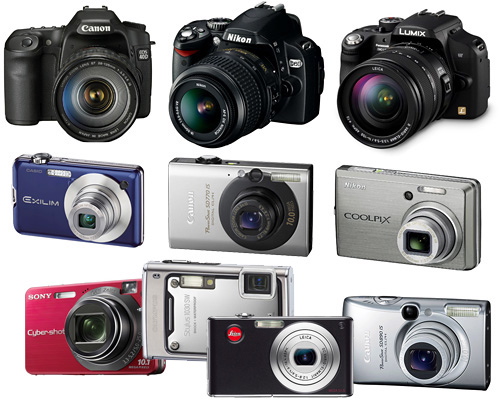
Digital cameras remain to be among the basic devices that people have and want to own today. This is despite the fast sales of the smartphones that have overtaken the laptop and even the stand alone camera units.

During this year's biggest camera show held in Cologne, Germany, the tough challenge facing camera manufacturers was clearly noted. They admit the fact that more consumers are turning to the smartphones. As such, the number of cameras being bought has slipped and printing of photographs has also gone down.
The Canon Digital Lifestyle Index revealed that sales for compact cameras went down by eight percent in the second half of 2011. Camera sales dropped by five percent in Australia in the same year. The case for the digital SLR, however, was different as an increase of 26 percent in sales was noted.

With regards to full-frame cameras, leading manufacturers Canon and Nikon are going to introduce more new DSLR models. The new units are targeted at both the beginners and the serious hobbyists but they command a higher price. As an example, Canon's EOS 6D expected to be out in the market this month is reported to sell at a price of $2,400. This 20.2-megapixel camera is capable of capturing high-definition video and 4.5 photos per second. It is also very lightweight at only 770 grams.

For its part, Nikon has its D600 unit with a lot of great features. It boasts of a 24.3 megapixel resolution and can shoot 5.5 frames per second. And its price? It is more expensive than the Canon unit at nearly $2,600.
Other leading brands that are keeping up include Sony and Leica. Sony has its RX1 which has a large sensor in a compact frame as well as the SLT camera while Leica has two full-frame but compact units - the Leica M and M-E.

Apart from the full-frame types, sales of the compact system cameras are seen to be doing well. This kind of camera has changeable lens and a small body. In 2011, its sales went up by 156 percent.
For this holiday season, Olympus is seeing a 25 percent share of the market. The company's contributions to this compact system camera are its Pen Lite E-PL5 and Pen Mini E-PM2 which have a 16-megapixel sensor and touch screens.
Sony cannot be beaten in this area. It has its NEX-6 which features a 16-megapixel sensor and HD video capture.
DSLR

Finally, a growing trend today and going into the future is the camera with wireless sharing capability. There's no doubt that leading manufacturers are catering to this type what with more people now sharing images online instead of printing them out.
Samsung has already released its 4G Galaxy camera while Nikon has its Coolpix S800c. Both units operate via Google Android software and they can immediately share photos online without having to store them first on the computer. Other camera models with wi-fi capability include the Panasonic Lumix GH3 and Canon 6D.

So expect cameras to continue to advance through the coming months of 2013 and be ready with your budget if you plan to get one of them.

Which Smartphone Should You Be Going For?

0 comments
If you are confused about which smartphone to buy, then relax, you are not the only one. With several new smartphones suddenly up for exciting prices, it sure is a dilemma. iPhones can be cool, but then with so many people going for iPhones, it can also become known as "yet another phone". Blackberrys have been around for a long time, and with Palm launching their 'iPhone killer', the competition is sure heating up.

So, which smartphone should you be going for? The answer to this depends exactly on what your requirements are. There are several different things you can do with a smartphone - surf the internet, using it as a compass for directions, use it as your audio or video device, play games, taking pictures and a lot more. However, not everyone is going to need all those things.

Recently, a study was conducted to look into the satisfaction of smartphone users to the various parameters that were available on their phones. This report debunked what most people had thought - that iPhone was the best smartphone out there. As a matter of fact, iPhone is overall third in the list based on the satisfaction of the users.
Android vs iPhone

If your primary need is surfing the internet, send emails or checking your voice mail, then go for Palm Pre - 86% of the users are happy with Pre. You can go with Android if you are going to use the GPS quite extensively. An interesting aspect of the study was that iPhone did not take the lead in any of the several parameters studied. Maybe this is an indication of iPhone having moved away from the Apple fanboy club to the mainstream.

Anand Srinivasan, founder of KnewThis.com, an upcoming buyer's Q&A portal [http://knewthis.com] says that the statistics still need not be taken at face value since the survey need not be highly representative. Also, the answers could be more influenced by the network carriers than the actual handsets. So, depending on where you are from, and the reliability of the carriers in your area, and what the smartphone owners in your neighborhood say about their phones, go for the right one.

Sunday, February 24, 2013

How To Choose The Best Mobile Device

0 comments
Smart phones and tablets are found everywhere, virtually everyone has some form of gadget in their possession at one point or another. A teacher, student, security guard, businessman, public transportation driver, everyone who lives in a modern society has this need for a mobile device. The presence of mobile devices can be explained by both the wants and needs of its users. Everyone has different reasons for using a mobile device. It is that diversity of reasons that proves just how versatile mobile devices have become. It has become a tool that can be used for nearly everything.

Children do not really need something that's big and full of features. Chances are parents give their kids phones for the sake of being able to communicate with one another. When buying a phone for a child the main consideration should be price and durability, since all people know how well children handle small fragile devices.

Smart phones and tablets are used by teenagers mostly to surf the internet or go on social networking sites such as Facebook or Twitter. Practically every teenager now has some form of mobile device that lets them go online. The best mobile phone or tablet for a teenager would be something at the midrange. Teenagers may use their gadgets a lot, but the tasks they use do not require a lot of processing power in order to run effectively. If they do not stream music or videos that much then going for something mid-range would be ideal.

For people like businessmen or other professionals on the go the best option would be a mobile device that is powerful, compact, and has a long battery life. In fact battery life can sometimes make or break a purchase. People who are always on the go do not want to have to worry about the batteries of their mobile devices. There's nothing more annoying for a professional on the go than to hear a ring, and have their mobile device die on them. Or worse, be in the middle of making a project and have their tablet run out of batteries. Long battery life means more messages and calls and less time spent having to wait for a phone to fully charge.

When trying to look for the right model, try to look around and compare different models from different manufacturers. Doing so will make it easy to find which model and manufacturer offers the most features and value for their product. Some smart phones and tablets may not have the best features, but it does not mean that they should never be considered. Some devices that have fewer features tend to outperform in other aspects, just be sure to read reviews to get a good grasp of what owning a particular device is like.